Rep Directory Widget
The Rep Directory widget is a hosted React application served from embed.rxvantage.com/widgets/rep_directory. It renders a searchable list of RxVantage representatives inside an <iframe> and communicates with the embedding page through a secure postMessage handshake.
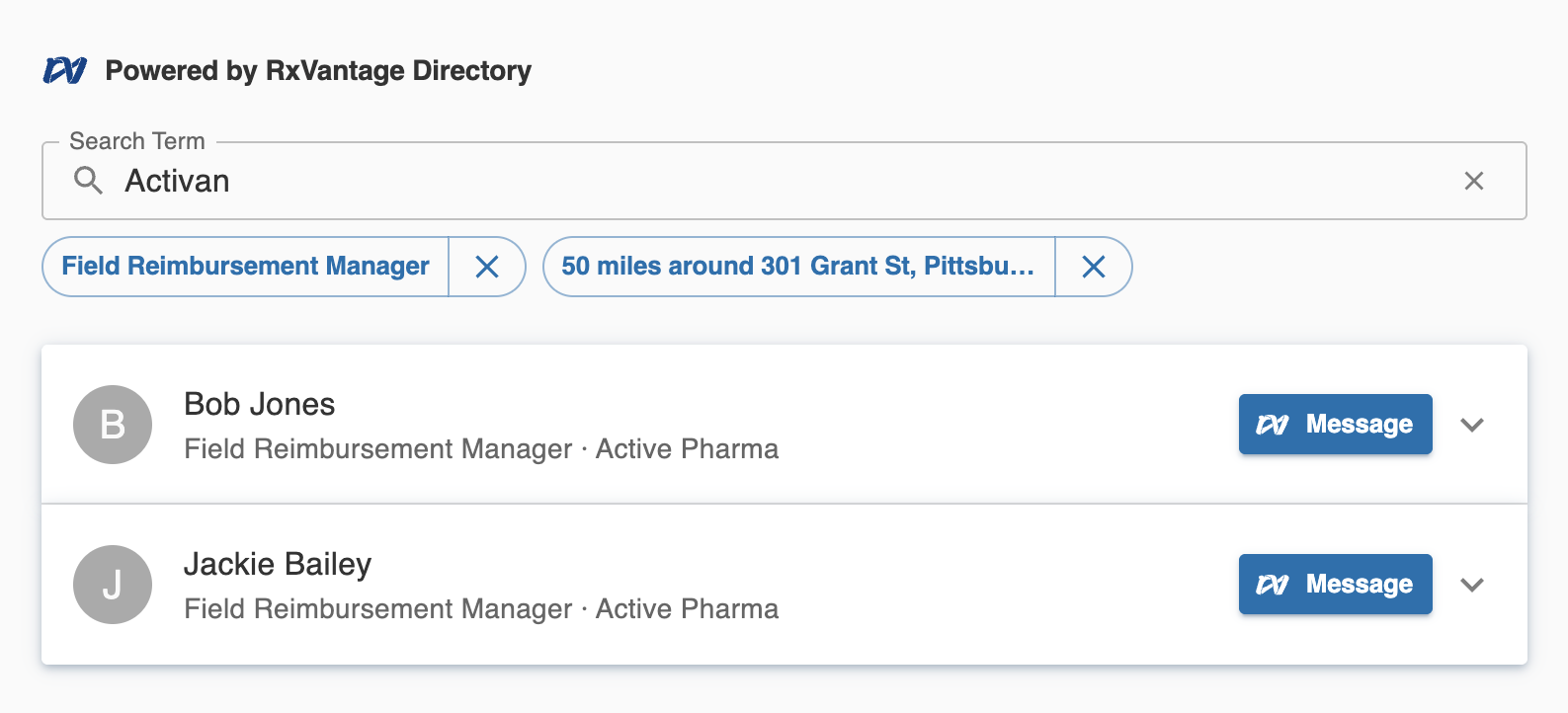 This document covers everything a third-party developer needs to embed the widget in their application using the
 @rxvantage/api-widgets SDK.
Table of Contents
- How it works
- Quick start
- Installation
- Authentication
- SDK integration
- Bare iframe fallback
- Token lifecycle
- Events
- postMessage protocol reference
- Local development
How it works
Third-party page                         embed.rxvantage.com
      │                                         │
      │  1. SDK creates <iframe>                │
      │─────────────────────────────────────────▶│ widget boots
      │                                         │
      │◀── 2. RXVANTAGE_WIDGET_READY ───────────│ signals ready
      │                                         │
      │─── 3. RXVANTAGE_AUTH_TOKEN ────────────▶│ delivers JWT
      │        (targetOrigin: exact)            │
      │                                         │ renders directory
      │◀── 4. RXVANTAGE_USER_SELECT ────────────│ on rep click
      │                                         │
      │─── 5. RXVANTAGE_AUTH_TOKEN (refresh) ──▶│ on token expiry
- The
@rxvantage/api-widgetsSDK creates a sandboxed<iframe>pointing toembed.rxvantage.com/widgets/rep_directory. - The widget signals readiness by posting
RXVANTAGE_WIDGET_READYtowindow.parent. - The SDK delivers the JWT by posting
RXVANTAGE_AUTH_TOKENwithtargetOriginset to the exact widget origin — the token never touches a URL. - The JWT is stored only in JavaScript memory inside the iframe; the widget makes authenticated API calls.
- When a user selects a rep, the widget fires
RXVANTAGE_USER_SELECTto the parent. - Before the token expires, the SDK proactively refreshes it and delivers a new one via
RXVANTAGE_AUTH_TOKEN.
Quick start
npm install @rxvantage/api-widgets
# or
yarn add @rxvantage/api-widgets
<div id="rep-directory" style="width: 100%; height: 600px;"></div>
import { RepDirectory } from '@rxvantage/api-widgets';

// 1. Obtain a JWT from your backend (server-to-server call to RxVantage).
const token = await fetchTokenFromYourBackend();

// 2. Initialize the widget.
const widget = RepDirectory.init({
  container: '#rep-directory',
  token,
  onTokenExpired: async () => {
    const res = await fetch('/api/rxvantage/token', { credentials: 'include' });
    return (await res.json()).token;
  },
  onUserSelect: user => {
    console.log('Selected rep:', user.name, user.specialty);
  },
});

// 3. Clean up when done.
widget.destroy();
Installation
Install the SDK from npm:
npm install @rxvantage/api-widgets
# or
yarn add @rxvantage/api-widgets
# or
pnpm add @rxvantage/api-widgets
The package ships ES2022 ESM with full TypeScript declarations. It requires a JavaScript bundler (Webpack, Vite, Rollup, esbuild, etc.).
For pages without a build pipeline, load the UMD bundle directly from the CDN:
<script src="https://embed.rxvantage.com/v1/api-widgets.umd.js"></script>
The bundle exposes a global RxVantage object. See the Vanilla JavaScript section below.
Authentication
The widget requires a short-lived JWT obtained through a server-to-server call from your backend to the RxVantage authentication endpoint. Never make this call from browser code — your API credentials must stay on your server.
POST https://api.rxvantage.com/auth/start-external-login
Authorization: Basic <base64(clientId:clientSecret)>
Your backend calls this endpoint, receives the JWT, and passes it to your frontend. The JWT is then handed to the SDK at initialization time.
The token is transmitted to the iframe exclusively through the postMessage channel — it never appears in a URL, browser history, server logs, or Referer headers.
SDK integration
React
import { RepDirectory } from '@rxvantage/api-widgets';
import type { RepDirectoryWidget } from '@rxvantage/api-widgets';
import { useEffect, useRef } from 'react';

interface Props {
  token: string;
  onRepSelect: (repId: string) => void;
}

function RepDirectoryWidget({ token, onRepSelect }: Props) {
  const containerRef = useRef<HTMLDivElement>(null);
  const widgetRef = useRef<RepDirectoryWidget | null>(null);

  useEffect(() => {
    if (!containerRef.current) return;

    widgetRef.current = RepDirectory.init({
      container: containerRef.current,
      token,
      onTokenExpired: async () => {
        // Hit your own backend to get a fresh token.
        const res = await fetch('/api/rxvantage/token', { credentials: 'include' });
        return (await res.json()).token;
      },
      onUserSelect: user => {
        onRepSelect(user.id);
      },
      onError: err => {
        console.error('Widget error:', err.code, err.message);
      },
    });

    const unsubReady = widgetRef.current.on('ready', () => {
      console.log('Rep directory ready');
    });

    return () => {
      unsubReady();
      widgetRef.current?.destroy();
      widgetRef.current = null;
    };
  }, [token, onRepSelect]);

  return <div ref={containerRef} style={{ width: '100%', height: '600px' }} />;
}
Note:
tokenis in theuseEffectdependency array. If your app re-renders with a new token (e.g. after account switch), the widget is destroyed and re-initialized. For in-place token updates without re-initialization, removetokenfrom dependencies and callwidget.updateToken(newToken)from your session management logic instead.
Vue 3
<script setup lang="ts">
import { RepDirectory } from '@rxvantage/api-widgets';
import type { RepDirectoryWidget } from '@rxvantage/api-widgets';
import { ref, onMounted, onBeforeUnmount } from 'vue';

const props = defineProps<{ token: string }>();
const emit = defineEmits<{ repSelect: [repId: string] }>();

const containerRef = ref<HTMLDivElement | null>(null);
let widget: RepDirectoryWidget | null = null;

onMounted(() => {
  if (!containerRef.value) return;

  widget = RepDirectory.init({
    container: containerRef.value,
    token: props.token,
    onTokenExpired: async () => {
      const res = await fetch('/api/rxvantage/token', { credentials: 'include' });
      return (await res.json()).token;
    },
    onUserSelect: user => {
      emit('repSelect', user.id);
    },
  });
});

onBeforeUnmount(() => {
  widget?.destroy();
  widget = null;
});
</script>

<template>
  <div ref="containerRef" style="width: 100%; height: 600px;" />
</template>
Vanilla JavaScript
npm / bundler:
import { RepDirectory } from '@rxvantage/api-widgets';

async function initWidget() {
  const res = await fetch('/api/rxvantage/token', { credentials: 'include' });
  const { token } = await res.json();

  const widget = RepDirectory.init({
    container: document.getElementById('rep-directory'),
    token,
    onTokenExpired: async () => {
      const r = await fetch('/api/rxvantage/token', { credentials: 'include' });
      return (await r.json()).token;
    },
    onUserSelect: user => {
      console.log('Selected rep:', user.name, user.specialty, user.location);
    },
    onError: err => {
      console.error('Widget error:', err.code, err.message);
    },
  });

  widget.on('ready', () => {
    document.getElementById('loading-spinner')?.remove();
  });

  widget.on('auth:error', ({ message }) => {
    showBanner(`Session expired: ${message}`);
    widget.destroy();
  });

  window.addEventListener('beforeunload', () => widget.destroy(), { once: true });
}

initWidget();
CDN / script tag (no build pipeline):
<!DOCTYPE html>
<html lang="en">
  <head>
    <meta charset="UTF-8" />
    <title>Rep Directory</title>
  </head>
  <body>
    <div id="rep-directory" style="width: 100%; height: 600px;"></div>

    <script src="https://embed.rxvantage.com/v1/api-widgets.umd.js"></script>
    <script>
      (async function () {
        const res = await fetch('/api/rxvantage/token', { credentials: 'include' });
        const { token } = await res.json();

        var widget = RxVantage.RepDirectory.init({
          container: '#rep-directory',
          token: token,
          onTokenExpired: async function () {
            var r = await fetch('/api/rxvantage/token', { credentials: 'include' });
            return (await r.json()).token;
          },
          onUserSelect: function (user) {
            console.log('Selected:', user.name, user.specialty);
          },
          onError: function (err) {
            console.error('Widget error:', err.code, err.message);
          },
        });

        widget.on('ready', function () {
          console.log('Widget ready');
        });
      })();
    </script>
  </body>
</html>
Bare iframe fallback
For environments where JavaScript execution is restricted (e.g. certain CMS platforms), you can embed the widget as a plain <iframe> with the token passed as a URL query parameter:
<iframe
  src="https://embed.rxvantage.com/widgets/rep_directory?token=YOUR_JWT_HERE"
  sandbox="allow-scripts allow-same-origin allow-forms"
  style="width: 100%; height: 600px; border: none;"
  allow="geolocation"
></iframe>
Limitations of the bare iframe fallback:
| Feature | SDK path | Bare iframe |
|---|---|---|
| Token delivery | postMessage (never in URL) | URL query parameter |
| Token refresh | Automatic via onTokenExpired | Not available — reload the iframe with a new ?token= |
onUserSelect callback | Yes | Not available |
ready / auth:error events | Yes | Not available |
The bare iframe path is provided for edge cases only. The SDK path is strongly recommended for all environments that support JavaScript.
Token lifecycle
Obtaining a token
Your backend calls the RxVantage auth endpoint and passes the resulting JWT to your frontend. Do not cache the JWT on the client — fetch a fresh one immediately before initializing the widget.
// Verify expiry before using a token:
const [, payload] = token.split('.');
const { exp } = JSON.parse(atob(payload));
console.log('Expires:', new Date(exp * 1000));
Proactive refresh
The SDK decodes the JWT's exp claim and schedules a refresh at 75% of the token's remaining lifetime. If a token has 60 minutes left, the refresh fires after 45 minutes. Your onTokenExpired callback is called at that point; return a fresh JWT and the widget continues without interruption.
What happens when refresh fails
- The SDK retries once after a 2-second delay.
- If both attempts fail, the
auth:errorevent fires and the widget enters a "Session expired" state. - To recover: call
widget.destroy()then re-initialize with a fresh token.
widget.on('auth:error', async ({ message }) => {
  console.error('Token refresh failed:', message);
  widget.destroy();

  const newToken = await fetchTokenFromYourBackend();
  widget = RepDirectory.init({ container, token: newToken, onTokenExpired });
});
Manual token push
If your application refreshes its own session and you want to push a new token immediately (without waiting for the proactive timer), call widget.updateToken():
yourAuthLibrary.on('tokenRefreshed', newToken => {
  widget.updateToken(newToken);
});
Events
Subscribe with widget.on(event, handler). Each call returns an unsubscribe function.
| Event | Payload | When it fires |
|---|---|---|
'ready' | {} | The iframe loaded and the auth handshake completed. The widget is now interactive. |
'user:select' | UserSummary | The user clicked a rep in the directory. |
'auth:error' | { message: string } | Token refresh failed after all retries. The widget shows a "Session expired" state. |
'error' | WidgetError | An unrecoverable error occurred (network failure, invalid config, etc.). |
widget.on('ready', () => {
  console.log('Widget ready');
});

widget.on('user:select', user => {
  // user: { id: string, name: string, specialty: string, location: string }
  openRepProfile(user.id);
});

widget.on('auth:error', ({ message }) => {
  showBanner(`Session expired: ${message}`);
});

widget.on('error', err => {
  // err: { code: 'AUTH_FAILED' | 'NETWORK_ERROR' | 'INVALID_CONFIG' | 'UNKNOWN', message: string }
  console.error(err.code, err.message);
});
postMessage protocol reference
This section documents the raw postMessage protocol for teams integrating without the SDK (e.g. native mobile webviews or server-rendered pages with custom JavaScript).
All messages follow this envelope:
// host → iframe
{ type: string; source: 'rxvantage-widget-sdk'; [key: string]: unknown }

// iframe → host
{ type: string; source: 'rxvantage-widget'; [key: string]: unknown }
Message types
| Message | Direction | targetOrigin | Payload |
|---|---|---|---|
RXVANTAGE_WIDGET_READY | iframe → host | '*' (no sensitive data) | { type, source } |
RXVANTAGE_AUTH_TOKEN | host → iframe | exact widget origin | { type, source, token: string } |
RXVANTAGE_TOKEN_REFRESH_REQUEST | iframe → host | locked parent origin | { type, source, requestId: string } |
RXVANTAGE_TOKEN_REFRESH_RESPONSE | host → iframe | exact widget origin | { type, source, requestId: string } |
RXVANTAGE_USER_SELECT | iframe → host | locked parent origin | { type, source, user: UserSummary } |
Handshake sequence
1. Create <iframe src="https://embed.rxvantage.com/widgets/rep_directory">

2. Listen for window 'message' events:
   if event.data.source !== 'rxvantage-widget' → ignore
   if event.data.type === 'RXVANTAGE_WIDGET_READY':
     → validate event.source === iframe.contentWindow
     → send RXVANTAGE_AUTH_TOKEN with targetOrigin = 'https://embed.rxvantage.com'

3. On RXVANTAGE_TOKEN_REFRESH_REQUEST:
   → call your token refresh logic
   → send RXVANTAGE_AUTH_TOKEN with new token
   → send RXVANTAGE_TOKEN_REFRESH_RESPONSE with matching requestId

4. On RXVANTAGE_USER_SELECT:
   → event.data.user contains { id, name, specialty, location }
Security requirements
targetOriginmust be exact when sendingRXVANTAGE_AUTH_TOKEN— never use'*'for messages containing credentials.- Validate
event.source— checkevent.source === iframe.contentWindowbefore processingRXVANTAGE_WIDGET_READY. - Validate
event.origin— checkevent.origin === 'https://embed.rxvantage.com'before processing all messages from the iframe.
Local development
Start the widget dev server:
yarn workspace widget_rep_directory start
# or from the widget directory:
cd widgets/rep_directory && yarn start
The widget runs at https://localhost:4004.
To test the full integration locally, point the SDK at the local dev server using widgetUrl:
import { RepDirectory } from '@rxvantage/api-widgets';

const widget = RepDirectory.init({
  container: '#rep-directory',
  token: yourDevToken,
  // Point directly at the local widget dev server instead of the production URL.
  // The postMessage targetOrigin is derived from this URL's origin.
  widgetUrl: 'https://localhost:4004',
  onTokenExpired: async () => {
    /* ... */
  },
});
Self-signed certificate: The dev server uses the monorepo's local TLS certificates (
localhost.pem/localhost-key.pem). Accept the certificate warning in your browser before testing, or add it to your system trust store.